Automation
Automation runs flows, opens review tasks and sends notices without anyone starting them by hand. Bowrain has two layers:
- Server-side rules, set in the web app, respond to events across the workspace.
- Local rules, declared in a project recipe, run around kapi commands in CLI and CI workflows.
Server-side automation
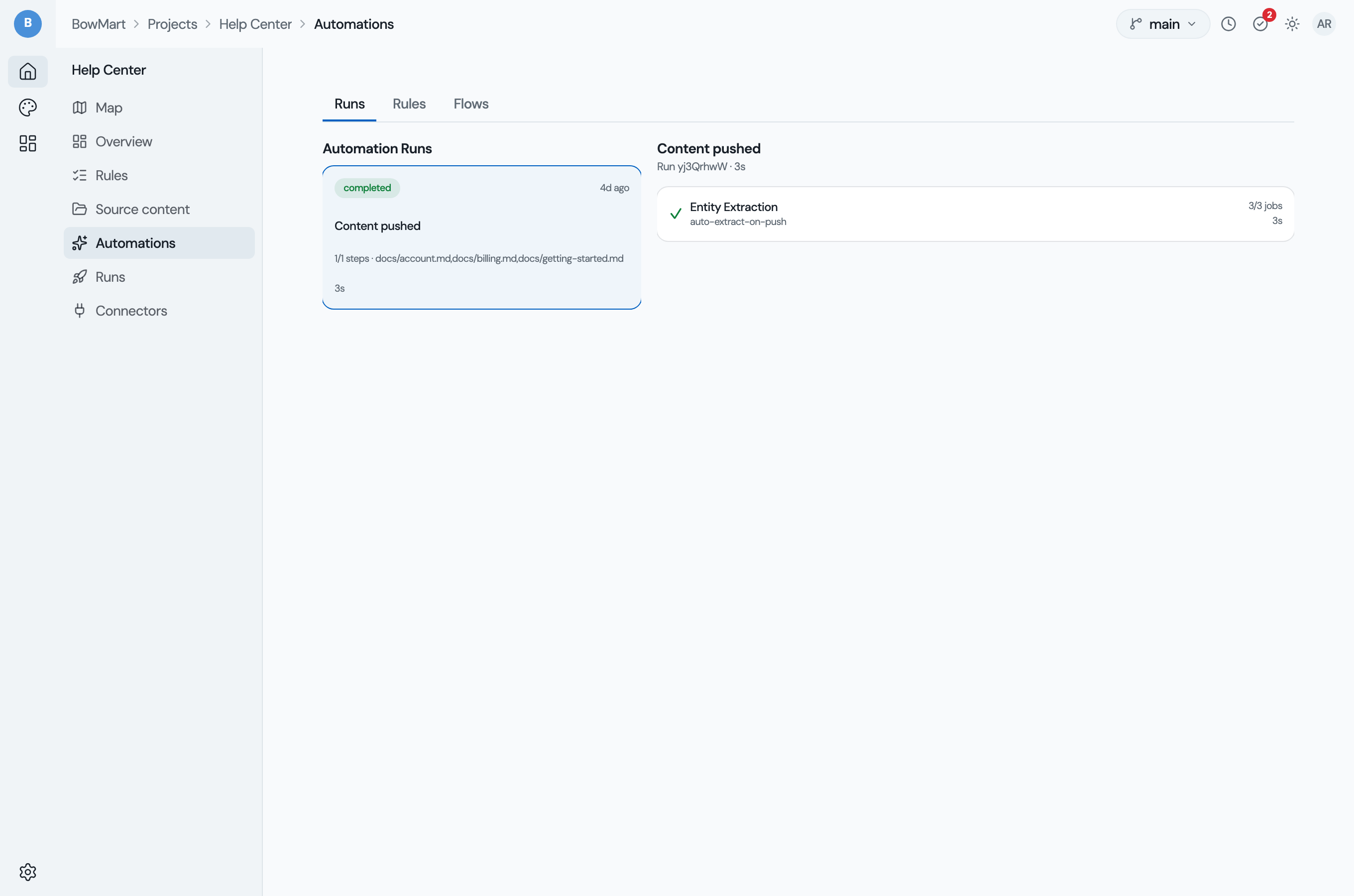
Server-side automations are event-driven rules configured in the Bowrain web app under Project > Automations. They respond to events on the server and trigger actions such as running flows or sending notifications. Because they react to events on the server, they apply to content from any connector.
The Automations page has three tabs: Runs (run history), Rules
(trigger, conditions and actions) and Flows (the flow canvas; see
Server-side flows). The Flows and Rules tabs share one editor,
so you write a run_flow action and the flow it runs in one place.
Triggers
A rule fires on one of these events:
| Trigger | Fires when |
|---|---|
connector.push.completed | Content is pushed, from a checkout or a repository |
project.updated | Project settings change |
quality.gate.fail | A language stops meeting a ship gate |
push.automations.completed | Every automation for a push has completed |
source.review.completed | A source review task is completed |
A connector fetch emits no event, so a rule cannot react to content fetched from a content platform. Start a run to catch that content up. No event fires when a flow finishes, so a rule cannot chain on a flow's completion.
Creating rules
- Navigate to Project > Automations > Rules
- Click New Rule
- Select a trigger event
- Add optional conditions (filter by project, locale, or event data)
- Add one or more actions. A
run_flowaction picks a flow from the project's flow registry (the built-in catalog plus any project flows authored on the Flows tab); the same flow applies to content from any connector - Save and enable the rule
Rules and the flow definitions they reference are persisted through the
project-scoped REST API: /api/v1/:ws/:id/automations for rules and
/api/v1/:ws/:id/flows for flow definitions. Rules can be reordered, disabled,
and duplicated from the editor. Bowrain checks a rule when you save it: every
action must be one the server runs, and a run_flow action must name a flow
the project can see. A rule that saves will fire.
Actions
| Action | What it does |
|---|---|
run_flow | Runs a flow over the project's stored content and writes the results back |
auto_translate | Starts translation jobs for the pushed items in every target language |
create_review_tasks | Opens a review task per target language for the project's reviewers |
create_source_review | Opens a source review task |
notify | Sends an in-app notification |
A run_flow action takes these parameters:
| Parameter | Meaning |
|---|---|
flow | The flow to run: a built-in flow or one authored on the project's Flows tab. Required. |
stream | The stream to read and write. Defaults to the stream the event names, or main. |
items | Comma-separated item names. Defaults to the items the event names (a push's files), or every item. |
target_locales | Comma-separated target locales, one pass each. Defaults to the project's target languages. |
The flow runs in the background over one item at a time, and the run's step records what it wrote. A flow the project cannot see, a flow whose tool this server lacks, or a tool that fails part way marks the step failed with the reason, in the run history and in the execution history.
Run history
Every server-side automation run is recorded under Project > Automations > Runs, with its trigger, its steps, the outcome of each step, and per-step logs. A run in progress updates in place as each step starts and finishes. Check it when a rule did not do what you expected.
Local automation (CLI)
Local automations run in kapi with the bowrain plugin. You declare them at the
top level of your project's kapi.yaml recipe. They run actions before or
after push, pull and flow runs, for developer and CI workflows.
Configuration
Add an automations: section to your kapi.yaml recipe:
automations:
  - name: checks-before-push
    trigger: pre-push
    actions:
      - type: run_flow
        config:
          flow: qa

  - name: sync-on-push
    trigger: post-push
    actions:
      - type: wait_translate
        config:
          timeout: 5m
      - type: pull
Trigger types
| Trigger | Fires when |
|---|---|
pre-push | Before kapi push sends content to the server |
post-push | After kapi push completes successfully |
pre-pull | Before kapi pull fetches content from the server |
post-pull | After kapi pull writes files locally |
pre-flow | Before kapi run executes a flow |
post-flow | After kapi run completes |
Action types
| Action | Description |
|---|---|
run_flow | Run a flow by name over the project's collections, as kapi run <flow> does with no --input |
wait_translate | Wait for the server-side run to complete (with configurable timeout) |
pull | Pull results from the server |
push | Push local content to the server |
A local run_flow action takes these parameters:
| Parameter | Meaning |
|---|---|
flow | The flow to run: one declared under flows: on the recipe, or a built-in flow such as qa. Required. |
fail_on_error | true aborts the command when the flow's check steps report findings, or when its checks did not run: the flow holds no check step, or its check steps read no content. Default false: report and continue. |
The flow runs as kapi run <flow> runs it inside the project:
- over every file the recipe's collections match;
- one pass per target language the flow applies to;
- with the recipe's voice profile and terms bound;
- with the results committed to the project store, and target files left as they are.
Its output, including the findings table from its check steps, prints with the
output of the command that triggered it. Under --json it goes to stderr, so
the command's JSON document stays intact. A flow that cannot run, because the
name is unknown or a tool fails, aborts the command whatever fail_on_error
says.
Example: a check gate before push
Prevent pushing content that fails the checks:
automations:
  - name: checks-gate
    trigger: pre-push
    actions:
      - type: run_flow
        config:
          flow: qa
          fail_on_error: true
If qa reports findings and fail_on_error is true, the push is aborted
before anything is sent, with the findings summary and the exit code
kapi check uses for a failed gate. Without fail_on_error the findings are
reported and the push goes ahead.
A flow can reach no verdict in two ways, and both count as checks that did not run:
- A check step over no content block, for example when every matched file is
empty, reports the cause
nothing_to_check. - A flow with no check step, such as
pseudo-translate, reports the causecontent_not_checked. Withfail_on_errorthe push is aborted with the cause and the exit codekapi checkuses when a check did not run. Without it, the command prints the cause and the push goes ahead.
Catching up on every push
The project's bowrain.converge policy, not an automation rule, catches the
project up on push. With the default on-push, the server runs a full pass
after every push: reuse, drafting, checks, terms, gates and review holds. Each
pass is recorded as a run anyone can watch:
# kapi.yaml
bowrain:
  url: https://bowrain.example.com/my-team/abc123
  converge: on-push        # on-push (default) | manual
kapi push from CI only pushes, and the server catches the project up on its
own schedule. kapi up pushes, watches the run, then pulls. See
Keeping content caught up for the model.
The policy travels with every push to the project's default stream. Setting
converge: manual in kapi.yaml takes effect on the next such push by anyone
who may push the project, a CI token included. Returning to on-push starts
server runs again without anyone asking, so it takes a push from a workspace
owner or admin. See
Settings a push carries.
Every run, started by a push, by kapi up, or manually, appears in the
project's Runs view in the web and desktop app, with its state (Running,
Up to date, Waiting for review), its trigger, the pass count, and a per-locale summary
such as "3 shippable · 1 waiting for review". A Run now button starts a run from the
app, and an in-flight run can be canceled. Translations waiting for review land in the
review session.
Quality gate events
Bowrain derives each target language's ship state from these gates:
| Gate | What it covers |
|---|---|
translated | Coverage |
checks | The checks |
terms | Terminology, where terms govern the language |
stale | Decisions on source that has changed |
rejected | Wording a reviewer rejected |
When a language stops meeting a gate, Bowrain
publishes quality.gate.fail for that gate and language. When it meets the gate
again, Bowrain publishes quality.gate.pass. An unchanged result publishes
nothing, and a language whose first result meets every gate publishes no pass.
A fail for a gate that is unmet because a check has no result says so.
Bowrain derives ship states when a convergence run finishes and when someone reads the project dashboard or the ship feed, so an event follows the change it reports by at most one of these.
The events report state and block nothing. A rule on quality.gate.fail can run
a flow, and a failed gate notifies the project's members. To stop content that
does not meet a bar, gate where it is produced: kapi check --ship exits
non-zero when a ship gate is unmet, and a local run_flow action with
fail_on_error: true aborts the command on the flow's findings.
When a job fails
A background job that stops for good, after any retries, sends a notice. The person who started the work receives it: whoever ran the push or the translation. Work that Bowrain started itself, such as a run after a push or an automation's translation jobs, reports to the workspace's owners and admins. The notice appears in the app at once and links to the project's run history. An email follows a couple of minutes later.
Failures are grouped by cause. Jobs in one workspace that fail for the same reason within an hour, for example because the workspace has reached its monthly AI usage limit, produce one notification per person. The notification keeps a running count ("40 translation jobs did not finish") and states the shared reason. The email for a group is sent once and gives the count at the time it was written. A job that fails on its own is a group of one, and its notice names the file and language it was working on.
Each person receives at most three job-failure emails per workspace in any hour, whatever the causes. Failures beyond that still appear in the app. To keep the notifications and stop the email, turn off email for the Automation category in notification preferences.
A run stops starting translation jobs once the workspace reaches its monthly AI usage limit. It stops with the reason usage limit reached, and the work done so far is kept.
Loop prevention
Bowrain tracks which event caused each automation. If a chain of rules goes more than five levels deep, Bowrain stops it and logs a warning, so circular rules cannot run forever.